
I scoured the internet, in other words, the first page of google search, for many hours today. A lot of the searches returned the same pages, but the most powerful part of those tutorials, videos, and forum posts were the comments. I tried the common solutions then I dug deep into the comments to see what was being said.
One person showed that you can launch the game by right-clicking the Unreal Engine project and launching from there. They said that the steam overlay doesn’t work from the editor but it should work using that method. Voila, it worked with no issue.
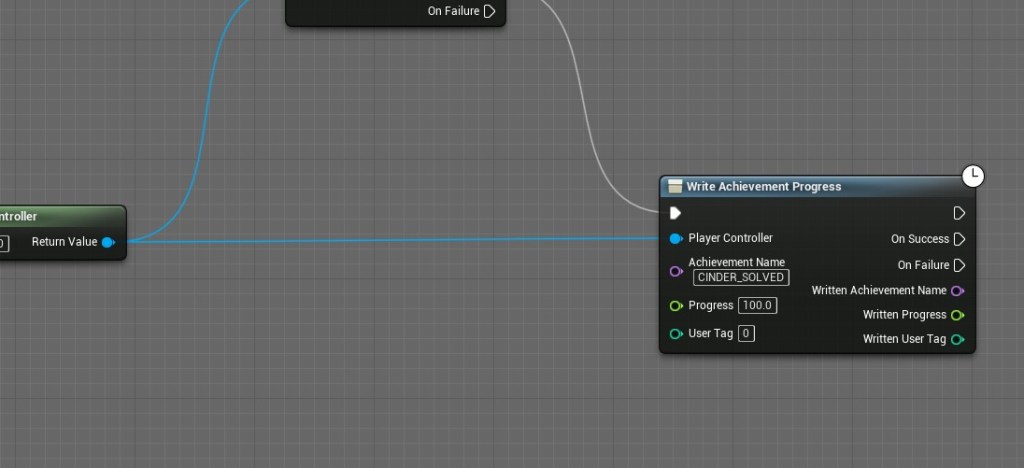
Finally, I was able to use the steam overlay on the game itself. As long as steam is running in the background it works. The next step was to test the achievements. I used the free AppID that anyone can use. It’s some game called Space War. I hooked up the achievements in BluePrints and made sure it was present in the text file for the DefaultEngine. It worked!
After that one problem was solved the next issues were easier and easier. I then tested my own custom achievements. I had to make sure they matched the one on Steamworks and then put them in the right place in the game.


The achievements worked and it even reflected on the account with the demo even if I didn’t play it through steam itself. It tracked the progress from the version of the game I was playing through the project. I’m learning a lot about how Steam works and it is quite fascinating.
Then I had the idea to put more achievements in the proper places in the game, so I don’t have to worry about it later. After they were all in place I put them onto Steamworks manually and made sure it matched what was in the text file as well. It is important that Unreal tells Steam which achievement is which. Writing the names and descriptions of the achievements was quite fun and the icons are still missing. The next step is to create the icons then I will get back to polishing the game. I’m glad to have finally figured out most of this.


 GoldenGratus Games